
What's New
Release notes for Inline apps, developer tools, and integrations.
October 10, 2026
macOS 0.2, build 5957 · macOS 0.2 tip, build 5959 · iOS TestFlight build 1342
New
- 🎧 Voice messages on iOS now keep playing when you switch chats or lock your phone. A playback bar lets you pause, change speed, or jump back to the message.
- 🗄️ Rebuilt Chat Info on iOS and macOS. Files, media, links, and voice messages now load reliably, including older ones from far back in the chat.
- 📁 Send folders on macOS. Drop or attach one and Inline zips it for you.
- Messages on iOS now follow your system text size.
Quality of life improvements
- Files you choose on iOS now wait in the composer until you send, so you can add a message or remove a file first.
- Return now sends on an iPad hardware keyboard, and Shift-Return adds a new line. You can turn this off in Settings.
- Turn off Centered Chats in macOS Appearance settings to use the full chat width.
- Choose a default chat icon in macOS Appearance settings.
- Copy a chat's link on macOS with Option-Command-C.
Better tools and APIs for agents and hackers
- Inline is now in the ChatGPT plugin store. See Add Inline to Your Agent.
- Hermes now runs on Umbrel, and you can install Inline from the Hermes plugin catalog with
hermes plugins install inline-platform. - Added the
add-inline-integrationskill. Give it to your coding agent to add Inline as a channel in a product or bot that already supports Slack, Telegram, Discord, or Teams. - Agent approvals now appear in the conversation where the agent is working, instead of your DM with it.
- Local agents are no longer limited to four sessions at a time. Claude also keeps its permission mode, including plan mode, between turns.
- Local agents on macOS now stay responsive in the background. After updating to CLI 0.7.16, run
inline bridge restartonce. - You can now create up to 30 bots per account.
- MCP can now read exact messages, forward messages, create reply threads, filter by sender, and ask teammates a question in a private thread.
- The CLI can now filter messages by sender with
--sender-id, return forwarding receipts, and list reply threads you haven't opened withinline chats list --include-subthreads. JSON output also includes pagination details. - Improved Hermes access checks and recovery of missed messages. Pin and backlink notices no longer start agent turns.
- Improved OpenClaw connection status and update details.
Fixes
- Fixed messages disappearing from chats and new threads, including ones sent or received while you were scrolled up.
- Improved reconnecting and catching up on missed messages on iOS and macOS.
- Opening a chat from a notification now lands on the latest messages.
- Fixed unexpected logouts on macOS after a temporary connection or sign-in failure.
- Fixed iOS message menus leaving a blank gap when closing, and chats losing their scroll position while the reaction menu is open.
- Fixed the iOS Search tab getting stuck in a keyboard loop.
- Fixed canceling a message that is still sending on macOS.
- Fixed chats vanishing from your list when deleting them failed.
- Fixed chat links that could fail to open a DM, including DMs with bots.
- Fixed archiving group chats you were invited to but hadn't opened.
- Fixed profile photos that stayed blank after a failed download.
- Fixed macOS message times keeping the wrong color after switching between light and dark mode, or not updating after a failed send.
- Fixed the message highlight, reply-preview layout, and swipe-to-reply avatars on iOS.
- Fixed ghost rows lingering over chats in the macOS sidebar. Also improved sidebar performance and preview contrast.
September 25, 2026
New
- 🎙️ Added dictation on macOS. Speak to write a message or start a new thread.
- 🗂️ Select multiple chats in the macOS sidebar to move them together, create a folder, or mark them as read.
- 🖼️ Added space photos on iOS and macOS, plus space badges for members of Pro spaces.
- Added iPad split navigation, with chats and the sidebar side by side.
- Open unread chats or mark them all as read from Inline's macOS Dock menu.
Quality of life improvements
- Choose your swipe-to-reply direction or turn off message double-tap and double-click actions. Your message gesture settings now sync across devices.
- Reaction pickers now suggest emoji from the message first. Also refreshed the iOS reaction picker.
- Chat translation preferences now sync across devices.
- Added a pink theme on iOS and macOS.
- Reply threads now inherit their parent chat's notification settings unless you choose otherwise.
- Mark an entire folder or a thread and its replies as read on macOS.
- Start a new thread from the macOS composer's plus menu, or drop attachments onto the empty page to begin composing.
- Added Invite to Space to the macOS command menu.
- Messages and the composer now stay centered on macOS.
- Improved macOS tooltips and Minimal message metadata.
Better tools and APIs for agents and hackers
- Browse folders on your agent's machine and choose its project from macOS Agent Settings. Requires an updated bridge.
- See your agent provider's remaining usage and reset times in Agent Settings, where supported by the provider and bridge.
- Codex now shows collapsible work summaries, command previews, and file changes. Also improved model and reasoning settings,
/compact, and/stop. - Improved Claude and Codex setup, with clearer errors and retry options.
- OpenClaw now supports 2026.9, with improved approvals, reply-thread support, and connection recovery.
- Improved reconnects and catching up on missed updates in Hermes, the realtime SDK, and the CLI.
Fixes
- Improved catching up on messages, unread counts, and membership changes after reconnecting.
- Fixed iOS message menus losing their preview, keyboard, or scroll position during live updates.
- Improved loading older messages on iOS. Your own messages no longer increase the scroll-to-bottom unread badge.
- Fixed scrolling while editing long messages and selecting text with double-click set to Ack on macOS.
- Fixed stale profile photos, full-size avatar previews, duplicate image drops, and missing files in macOS Chat Info.
- Improved notification delivery across desktop and mobile, with fewer stale or duplicate notifications.
- Fixed agent settings not remembering project and provider choices, stale agent lists, and skilled-agent mentions in new threads.
- Improved macOS dictation and restored the iOS microphone button after clearing the composer.
- Fixed macOS sidebar hover targets, closing pinned chats, and new-thread picker placement.
- Fixed copied thread links and backlinks, automatic thread titles, and mention matching.
- Improved rich-text rendering, forwarded-media spacing, and link-preview colors.
- Improved startup and resuming interrupted onboarding.
September 2, 2026
New
- 📝 Messages on macOS now support rich formatting, including headings, lists, checklists, tables, quotes, images, code blocks, and collapsible sections. This release also adds underline, strikethrough, highlight, and experimental native rendering for inline and display math.
- 🗂️ Added chat folders on macOS. Group conversations, choose a name and emoji, and organize folders in Open or Pinned. Pinned folders also appear in All Chats, and collapsed folders show a combined unread badge, with clearer unread indicators for nested threads.
- 🎨 iOS now has the same themes as macOS, with new color presets and gradient message bubbles.
- ✅ Added Ack on iOS and macOS. Double-click or double-tap someone else's message to acknowledge it with a small check-mark pill; repeat the action to remove it.
- Start a new thread directly from All Chats on macOS. Choose Home or a space, add participants and attachments, and write your first message in place. You can also filter All Chats by Home or a space without changing the selected sidebar chat.
- 🔗 Added space join links on iOS and macOS. Share a public space or invite people into a private one, with controls to turn links on or off.
- Added Sign in with Apple and Sign in with Google on iOS and macOS. iOS onboarding also has separate name and username steps and clearer sign-in progress.
Quality of life improvements
- Copy links to DMs, threads, and individual messages on macOS. Message links open the referenced message. Home threads now have short numbered references, just like space threads, for linking and search.
- Added
/threadon iOS and macOS to create a reply thread from the current conversation. Open the command picker from the composer's plus menu. - Reply threads now show the message they branched from, so the original context is visible above the replies.
- Follow or pin chats from more places on iOS, including All Chats and search.
- Newly opened chats now appear at the top of Open Chats by default.
- Command-K on macOS includes more of your local conversations, including chats that were previously missing from its results.
- Undo closing chats or folders and archiving conversations on macOS.
- Added Cleanup on iOS to close inactive chats and remove empty folders, matching macOS.
- Turn on Shorten Supported Links on macOS to replace supported pasted URLs with readable titles. Escape, Undo, or Backspace restores the original URL.
- Choose Grid's input and output devices in Audio and Video settings. Opt into unmuting when you join or muting when you are alone, and hide Grid from the sidebar if you prefer.
- Improved sharing from other apps on iOS, including send progress and recovery from interrupted uploads.
- Improved participant and mention search when adding people, bots, groups, or Agents. Reply-thread suggestions now include people and groups from the parent conversation, with better exact-name ranking.
- Added dedicated bot-owner settings on iOS and macOS, including token rotation.
- Improved macOS agent setup, with clearer progress, errors, repair options, and retry instructions.
- Adjust chat text size on macOS across all message layouts.
- Audio documents now play inline instead of opening as generic files.
- Notifications preserve meaningful line breaks, describe photos and other media, show encrypted photo previews on iOS, and open the exact message when possible.
- iOS now animates the delivery status from sending to sent. Also polished swipe-to-reply avatars and dark message bubbles.
- Software updates on macOS now open in their own window.
- Hover over truncated macOS sidebar titles to see the full name.
Better tools and APIs for agents and hackers
- OpenClaw can now create reply threads from DMs and keep replies, typing, and activity in the child thread. Also improved rich replies, DM routing, agent-authored buttons, and compatibility with OpenClaw 2026.8.
- Hermes now has native pickers for questions, approvals, and model selection, plus richer replies and agent-authored buttons. Added optional processing reactions, quieter progress updates, and compatibility with Hermes 0.21.
- Browse and open existing local Codex sessions with
/sessionsor/open, resume the exact session before another prompt, and release Codex from Inline with/stopor/close. Project discovery now includes saved Codex roots and larger paged catalogs. - Codex work now stays in one updating Working message and finishes as a normal reply, preserving complete long-form output instead of splitting progress across many messages. The message limit is now 100,000 characters.
- Added browser-based login to the Inline CLI. Agents and non-interactive tools can start the login flow for you to finish in your browser. CLI 0.7.7 also preserves rich Markdown input, resumes interrupted Realtime V3 uploads, installs the Codex plugin without extra flags, and improves shell completions and update checks.
- Added an AppleScript API for the Mac app. Find people and chats, create threads, inspect the current selection, read recent cached messages, send Markdown, and create Hookmark-compatible links from your own scripts.
- Expanded the Bot API with polling, webhooks, thread and participant events, files, skill catalogs, and a typed TypeScript client. Bots can send rich Markdown, add callback or copy-text buttons, update buttons independently, and forward or delete messages in batches.
- Added Realtime V3, with encrypted client-server transport, TypeScript and Rust support, durable resumable uploads, and authoritative recovery after reconnects or lost responses.
- Added Agent profile management to the Bot API, CLI, SDK, OpenClaw, and Hermes. The experimental Skilled Agents UI on iOS and macOS lets bot owners create named specializations, set a skill and instructions, and mention them in existing conversations.
Fixes
- Improved catching up on missed messages, read state, unread counts, and chat updates after reconnecting. Damaged or incomplete local chat history can now recover from bounded authoritative snapshots without clearing the account.
- Fixed uploads that could stall, duplicate work, or unexpectedly sign you out. Large transfers now resume after reconnects and recover safely when finalization or a provider response is interrupted.
- Improved sign-in retries, logout, and account switching, including cleanup of stale account state.
- Fixed stale or duplicate macOS notifications, with better grouping and handling of replies and mentions.
- Fixed iOS chat previews and transitions when opening a conversation from a notification.
- Settings changes no longer interrupt OpenClaw's reply connection. Fixed agent settings that could stay loading or show stale results after switching bots or chats.
- Fixed code-block and rich-formatting errors in streamed bot replies, including incomplete fences, repeated progress updates, stale disclosure state, and broken image-gallery selection.
- Fixed pinned threads moving out of pinned folders, and restored chat placement when undoing a close on macOS.
- Fixed file paths being mistaken for slash commands and improved command and mention completion in the macOS composer. Autocomplete no longer resizes the chat while it is open.
- Improved macOS voice recording, including draft recovery, cancellation, and caption spacing.
- Improved Grid reconnects, screen sharing, and cleanup after leaving or losing access.
- Fixed cases where macOS could get stuck while quitting or loading the sidebar.
- Improved MCP browser sign-in and fixed connections left open after failed initialization.
- Improved macOS sidebar unread navigation and reporting when a chat cannot be opened.
- Fixed the forwarding picker showing an empty state before chats had finished loading.
- Fixed repeated press-and-hold urgent nudges and nudge toolbar press handling.
- Restored active reaction colors and corrected macOS reply-preview backgrounds and swipe-to-reply avatar movement.
- Fixed long link-heavy messages that could make the app unresponsive, and stopped URLs inside code from generating previews.
August 15, 2026
macOS 0.2 tip, build 4947 · iOS TestFlight build 1193
New
- 🏠 iOS has an all-new Home with Open, All Chats, and Search, plus faster navigation and more control over how chats are shown.
- 🧵 The macOS sidebar now shows reply threads under their parent. You can pin or collapse them together, rename a reply thread, or open one beside the main conversation.
- 🎧 Added Grid on macOS: lightweight voice rooms for spaces, with presence, screen sharing, and controls for microphones, room names, and access.
- 🎨 Added themes on macOS, with new color presets across the sidebar, chats, composer, Grid, and settings.
- 🤖 Added one-click agent setup on macOS and in Inline CLI 0.7.3. Connect OpenClaw, Hermes, Codex, Claude, OpenCode, or Amp, create or reuse a bot, then start it and verify it is ready.
- Added a local agent bridge so coding agents can run as private Inline bots, keep workspace context, and continue work in reply threads.
Quality of life improvements
- Improved bot setup and management, including profiles, chat controls, and commands such as
/command@bot. - Added Copy as Markdown for threads, with clean text and media links ready to paste as reference.
- Drop files or media onto a macOS sidebar chat to open it with the attachments ready as a draft.
- Press and hold a chat on iOS Home to preview it and see its actions.
- Command-K on macOS is faster, with immediate local results and better ranking over time.
- Added Privacy settings for Appear in Global Search and Share Time Zone. Both are on by default.
- Improved document, X, and Figma previews. Notifications now show document names and more reliable avatars.
- Choosing All Notifications now follows the chat, so it stays visible in your sidebar.
- Clear a conversation only for yourself, or privately share a thread with another Inline user.
- Improved profile setup, including Memoji profile photos on macOS and new Account settings on iOS.
- Improved macOS Settings, software updates, menus, emoji options, and email-code autofill.
- The iOS share menu now suggests the Inline chats you share with most often.
- Made reactions more compact and unread badges more consistent.
- Improved OpenClaw and Hermes setup and thread support. MCP now supports ChatGPT apps.
- Added Connectors on macOS and iOS. Connect Notion or Linear, reference pages with
[[, and create tasks from Inline.
Fixes
- Fixed sign-in, account switching, and fresh-account sync issues.
- Fixed incorrect unread counts.
- Fixed iOS chat opening, navigation, and share routing.
- Fixed iOS attachment sizing, message layout, and toolbar state.
- Improved macOS message performance and chat switching.
- Fixed macOS compose autocomplete, send-button state, and file drops.
- Fixed duplicate or misrouted bot and agent replies.
- Fixed notification settings, sender avatars, and invalid push tokens.
- Fixed media sends that could stall and URL previews that could disappear.
- Fixed message ordering and permission checks for chat actions.
July 8, 2026
macOS 0.2, build 4495 · iOS on TestFlight
Better tools and APIs for agents and hackers
- Released new plugins for OpenClaw and Hermes Agent with improved thread support.
- Released an open-source Matrix bridge, so you can use Inline in Beeper if that's your thing.
- Released a new version of the Inline CLI with new commands for agentic usage. The new
transcriptcommand gives agents a complete thread as Markdown, including files and media. - Released
inline-sdkandinline-clientfor Rust. - Published
llms.txtand made the docs more agent-friendly. - Improved our MCP server so it is more capable at finding and summarizing things.
June 29, 2026
macOS 0.2, build 4354 · iOS on TestFlight
New
-
🎙️ Added voice messages on macOS and iOS.
-
💫 Added a smooth new iOS send-message animation.
-
GIFGIF support on macOS and iOS! -
👀 Added a Follow button for threads. Followed threads appear in your sidebar when they receive a new message.
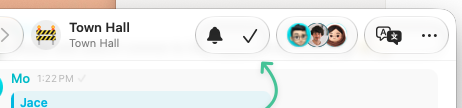
We automatically follow threads you create, reply threads addressed to you, and reply threads you write in. If a thread is noisy, you can manually unfollow it and we won't automatically follow it again.
-
🏷️ You can now create user groups such as
@eng,@design, or@support. They make it easy to mention or add multiple people to a thread at once. Create one from Space Settings. -
🔍 Search messages from Command-K on macOS.
Quality of life improvements
-
Added a new typing animation and a recording voice compose status.
-
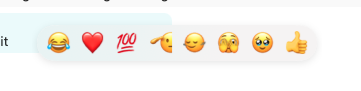
The macOS reaction picker now sorts suggestions by your recent usage instead of using static defaults.
-
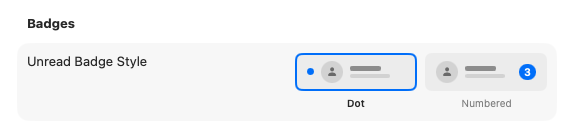
Choose whether macOS shows unread badges as dots or numbers.
-
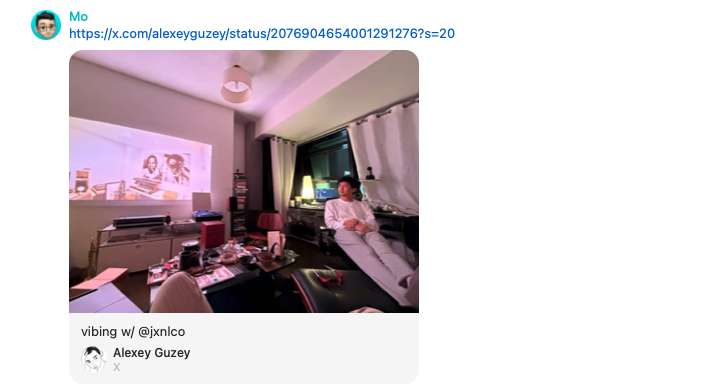
Significantly improved large X/Twitter cards with larger media, author profiles, and long-text support.
-
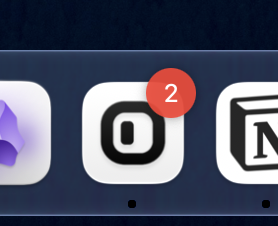
The dock badge now includes unread followed threads, not only unread direct messages.
-
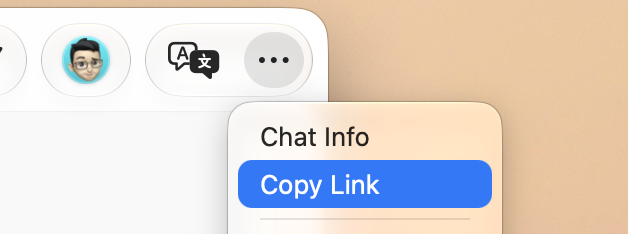
Added Copy Link for sharing threads with other Inline users.
-
Added an all-new Apple share-menu experience for sending content from other apps into Inline.
-
Added haptic feedback when reordering threads in the sidebar.
Fixes
- Thread icons now match across macOS, iOS, and notifications.
- Fixed a bug on iOS 27 where the composer could move outside the viewport.
- Improved voice waveform rendering and fixed composer state after sending voice messages.
- Fixed message hover states getting stuck in minimal mode.
- Fixed the emoji picker in the composer and switched it to our custom picker.
- Reduced scrolling lag on macOS and iOS. There is still more to improve!
- Fixed message-tap routing for documents, attachments, and URL previews on iOS.
June 19, 2026
New
- 💬 Bubbles now have tails! Thanks to Jace for her help polishing them.
- 🧲 Sticky avatars make scrolling chats nicer on macOS and iOS, in both minimal and bubble message modes.
- 🔗 Linking to a thread with
[[thread]]now shows a backlink in the linked thread. This is the beginning of our multiplayer knowledge graph system.
Fixes and improvements
-
Pinning a message now shows a small service message in the chat.
-
You can right-click a URL preview and exclude its domain from previews in your space threads.
-
Improved large URL previews across more card and media types.
-
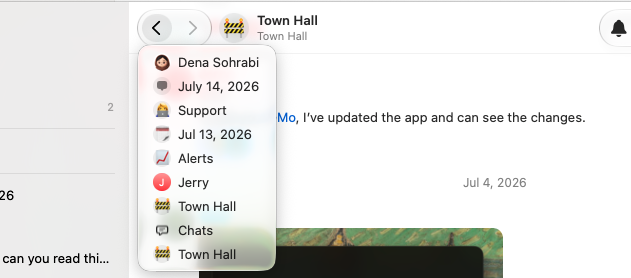
Press and hold the macOS back or forward toolbar button to see your navigation history.
-
Configure what holding or double-clicking a message does on macOS.
-
Improved voice waveform rendering and reset composer state after sending voice messages.
-
Fixed macOS 26 toolbar and background behavior, including the glass composer height.
-
Fixed holding on reactions on macOS 15.
-
Added composer auto-pairing for
[]and().